

 ChatGPT
 Perplexity
 Claude
 Gemini
The difference between a generic cartoon and a proper chibi is almost entirely in the prompt. Models default to realistic proportions unless you push them, so the right chibi style prompt keywords, especially "super deformed" and "oversized head," do more for output quality than any settings menu. This guide covers what defines chibi, how to build prompts that hold the proportions, and a photo-to-chibi workflow that gives the model facial structure to preserve.
What Is Chibi Art Style
Chibi characters have exaggerated proportions: oversized heads and eyes, small chubby bodies, stubby limbs, tiny noses, and minimal detail. The head typically runs one third to one half of the character's total height. That ratio is the single most important thing your prompt has to communicate.
Artists also call the style super deformed, or SD. The term comes from the Japanese "deforume" (stylistic distortion), itself borrowed from the French "déformer." According to Wikipedia's history of the format, it emerged from a student's contributed illustration to a Bandai hobby magazine in the early 1980s, and Bandai first sold the SD Gundam capsule toys in Gashapon machines in June 1985. Chinese-language art communities use the equivalent term Q-version (Q版), where "Q" is a phonetic abbreviation for "cute."
Chibi sits inside the broader kawaii aesthetic, which grew out of a 1970s Japanese schoolgirl subculture and Sanrio's commercialization of cute. As Hello Kitty's own history shows, the character launched on a vinyl coin purse in 1975 and helped define that look. Kawaii's visual core, a large head and small body mimicking newborn proportions, is exactly what a chibi prompt has to reproduce.
The Anatomy Of A Chibi Prompt: A Simple Formula
Every reliable chibi prompt fills five slots:
Subject: Who the character is, plus the proportion cue. Example: "a chibi girl with an oversized round head and tiny body."
Style modifier: The visual style. Example: "kawaii anime style, super deformed."
Background: Keep it simple so the character dominates. Example: "plain pastel pink background."
Lighting: Soft and even suits the style. Example: "soft studio lighting."
Finish: The surface quality of the final image. Example: "high detail, clean line art" for 2D or "glossy 3D vinyl toy finish" for 3D.
Assembled, the worked example reads:
A chibi girl with an oversized round head and tiny body, huge sparkling eyes, kawaii anime style, super deformed, plain pastel pink background, soft studio lighting, high detail, clean line art
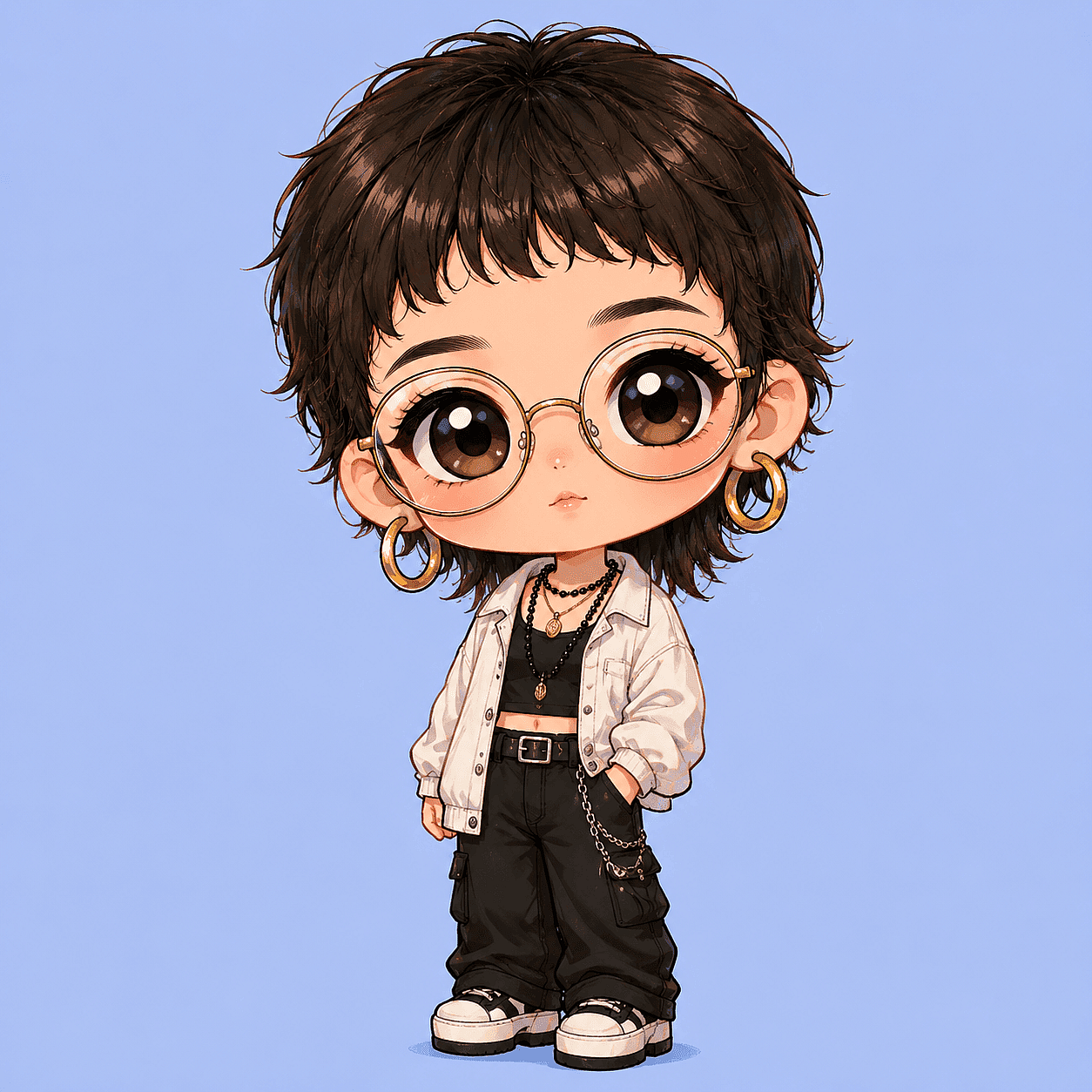
The slots are independent. Swap the finish slot and the same character becomes a 3D figurine; swap the background slot and it becomes a sticker. That modularity is why a formula beats memorizing full prompts.
Essential Chibi Prompt Keywords And Modifiers
These terms recur across model documentation and community practice because they map to concepts the models were trained on:
- kawaii: anchors the output to the Japanese cute aesthetic of rounded faces, large eyes, and petite bodies.
- super deformed: the strongest proportion trigger. It tells the model to exaggerate the head and shrink the body instead of drawing a normal anime character smaller.
- chibi: use it with "super deformed" so the prompt reinforces the proportion cue.
- Q-version: worth adding when the style target comes from Chinese game art or donghua merchandise, where Q版 is the standard term.
- oversized head, tiny body: explicit proportion language for models that ignore style shorthand.
- huge expressive eyes: eye size drives the cuteness effect more than any other facial feature.
- 3D vinyl toy finish: switches output from illustration to collectible-figure rendering.
- pastel background: keeps the palette in kawaii territory and prevents busy scenery.
- soft lighting: avoids harsh shadows that read as realism.
- high detail: sharpens line work and surface texture without adding realistic anatomy.
One caution on subjects: do not name copyrighted characters in prompts. A March 2026 Debevoise briefing notes that prompting AI to generate specific copyrighted characters can raise infringement exposure, and Warner Bros. Discovery's 2025 complaint against Midjourney cites outputs generated from prompts that never named the characters at all. Describe traits instead: "a chibi plumber in red overalls" is still risky because generic keyword pairs can converge on protected characters; "a chibi mechanic with teal hair and a wrench" is not. OpenArt's IP Safety Check can scan your output for potential IP conflicts before you share or sell it.
2D And 3D Chibi Prompt Styles
The finish slot of the formula splits chibi into distinct looks, each with its own keyword set.
2D Flat Chibi
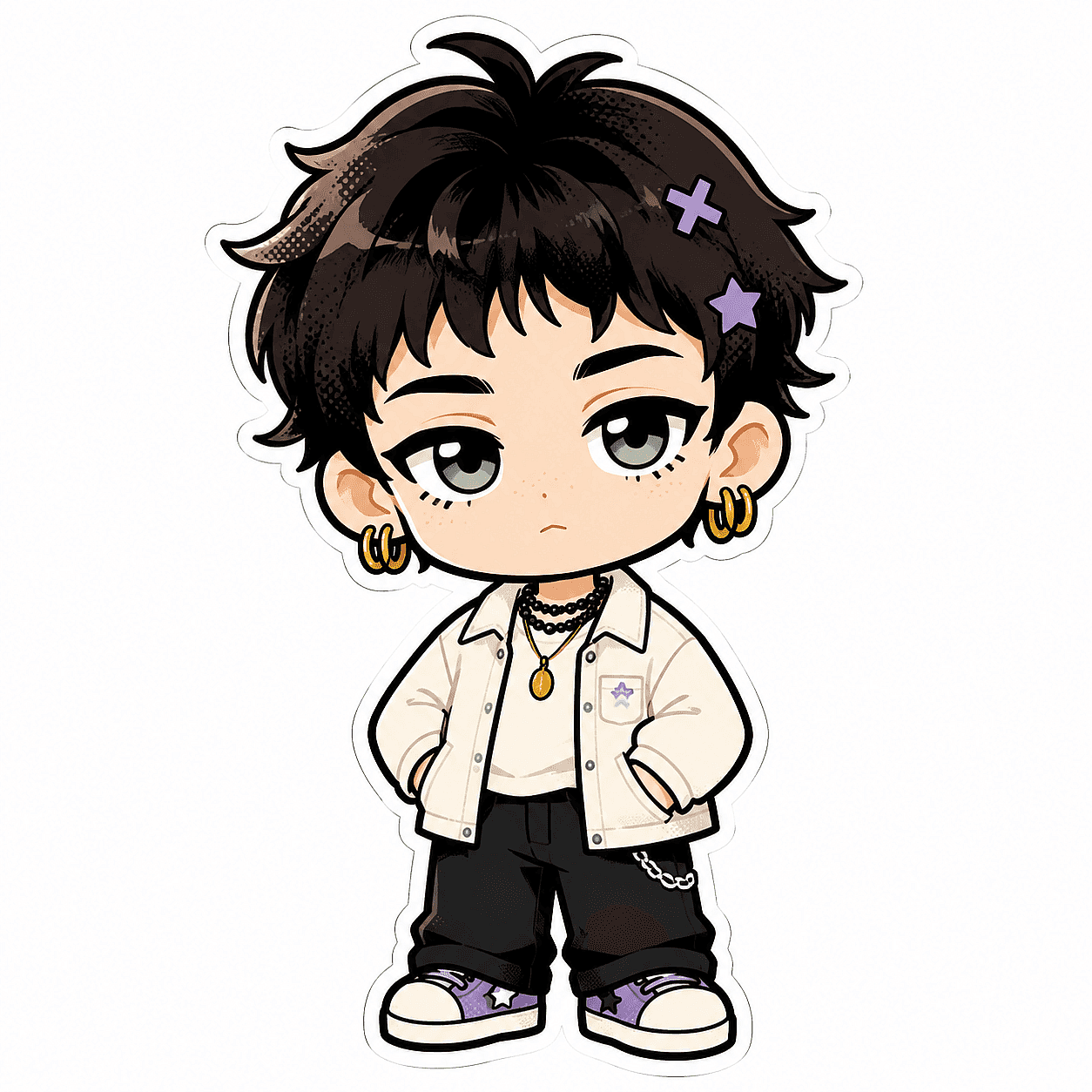
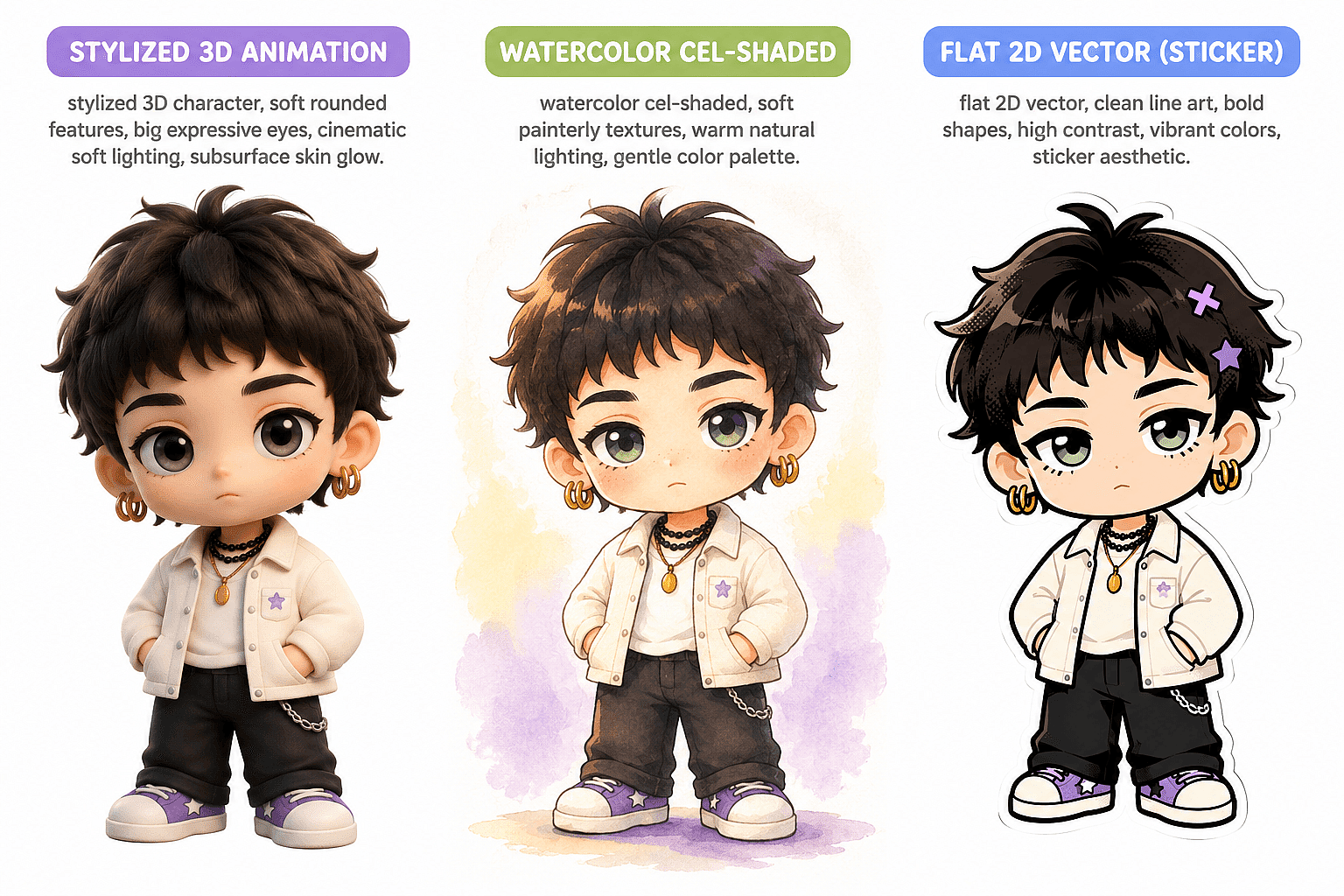
This is the classic sticker and emote look: bold outlines, flat color fills, no gradients. Key terms are "cel-shaded," "flat color," "clean vector line art," "sticker aesthetic," and "white background." Use it for messaging stickers, Twitch emotes, and stationery-style illustration where the art has to read at small sizes.
Chibi boy with oversized head and stubby limbs, cel-shaded, flat color, clean vector line art, sticker aesthetic, white background, kawaii
3D Toy-Style Chibi
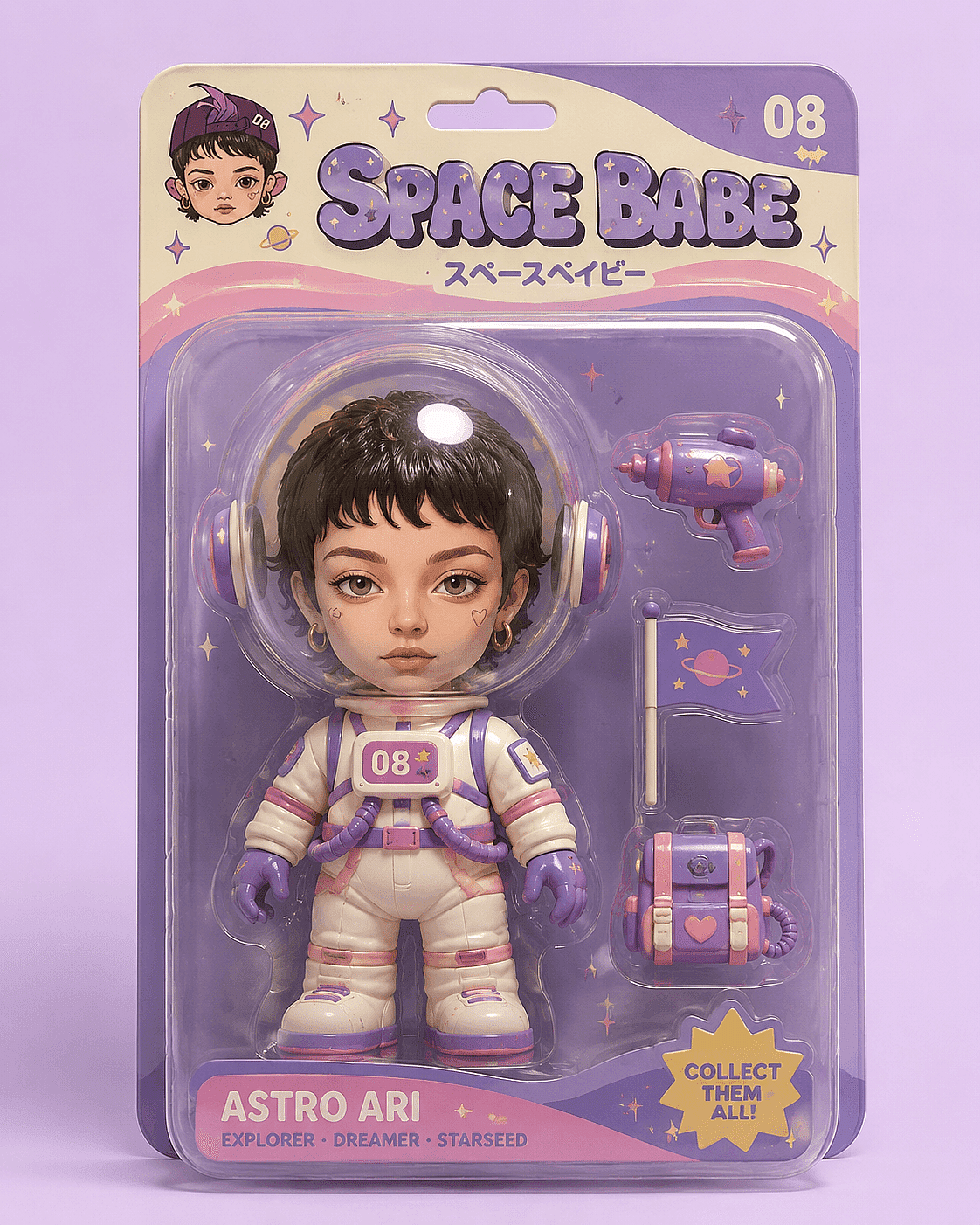
This variant generates the character as a physical collectible. Key terms are "3D render," "vinyl toy finish," "glossy surface," "soft studio lighting," and framing cues like "product photography" or "action figure in blister pack." The blister-pack framing is a strong trigger because the models associate it with toy photography.
3D render of a chibi astronaut, glossy vinyl toy finish, oversized round helmet, tiny body, displayed in a blister pack, product photography, soft studio lighting, pastel background
Stylized 3D Animation And Soft Storybook Chibi
Two softer variants sit between flat 2D and hard toy generations. For the stylized 3D animation look, use "stylized 3D character, soft rounded features, big expressive eyes, cinematic soft lighting, subsurface skin glow." For the soft hand-painted storybook look, use "watercolor cel-shaded, soft painterly textures, warm natural lighting, gentle color palette." Both keep chibi proportions but trade the plastic sheen for warmth, which suits storybook illustration and YouTube thumbnails aimed at family audiences.
Common Chibi Prompt Mistakes (And How To Fix Them)
Three failure modes account for most bad chibi output, and each traces to a missing or contradictory keyword.
Proportions not exaggerated enough. The model generated a normal anime character. Cause: "chibi" alone is too weak a signal for some models. Fix: add "super deformed, oversized head, tiny body, 2 heads tall" and remove any full-body realism cues like "full figure portrait."
Eyes too small or too sharp. The face reads as adult anime rather than kawaii. Cause: no explicit eye direction, so the model defaulted to its base style. Fix: add "huge round sparkling eyes, tiny nose, simplified facial features."
Realistic details breaking the cartoon. Visible skin pores, individual fingers, fabric weave. Cause: terms like "photorealistic," "8k photo," or "detailed skin" leaked in from a reused prompt. Fix: strip realism keywords, add "smooth simplified shapes, minimal detail," and move the realism terms to the negative prompt.
Conflicting keywords usually block the fix. "Photorealistic chibi" asks the model for two incompatible things; pick one.
Negative Prompts For Clean Chibi Output
A negative prompt tells the model what to exclude, and for chibi work it does half the job. The standard exclusion list:
realistic proportions, realistic anatomy, distorted face, extra limbs, extra fingers, long body, small head, photorealistic skin, text, watermark, signature
Where you enter it depends on the tool. Stable Diffusion interfaces, including OpenArt's, provide a separate negative prompt field. Midjourney uses the inline --no parameter, for example --no realistic proportions, text. ChatGPT and Gemini take natural language: write "avoid realistic proportions, distorted faces, extra limbs, and any text or watermarks" as a sentence inside the prompt.
"Text artifacts" earns its place on the list because stylized generations can add stray lettering in the background. Excluding text keeps sticker sheets and portraits clean; if you want deliberate text, add it in an editor afterward.
Face Preservation: Turning A Real Photo Into Chibi
Use image-to-image generation to preserve more of a specific person's face. The workflow uses your photo as the structural starting point instead of random noise. OpenArt's image generator supports this workflow directly: upload the photo, write a chibi prompt using the formula above, and generate.
The reference image gives the model more facial structure, hairstyle, face shape, and expression information to carry into the chibi version.
For repeated use of the same person, save them with Character Builder. It builds a persistent character from a single reference image and supports every type of character, not just humans. Saved characters live in your library and drop into future prompts via the @Character tag, helping you change outfits and poses while maintaining identity.
Chibi Prompts Across AI Tools
The formula and keywords transfer across every major generator, but the syntax around them does not. Verify current model names before relying on a tutorial; several major tools swapped default models during 2025 and 2026. Here is how the same chibi prompt adapts per tool:
| Tool | Chibi-relevant model | Style syntax | Negative prompts |
|---|---|---|---|
| Midjourney | Niji 7 (anime-tuned, released January 2026); V8.1 default | --niji 7, --sref [URL], --oref [URL], --ar 9:16 |
Inline --no |
| ChatGPT | GPT-4o native image generation (default since March 2025) | Natural language only | Natural language ("avoid...") |
| Gemini | Gemini 2.5 Flash Image; Gemini 3 image models | Natural language only | Natural language |
| DALL-E | DALL·E 3 replaced as ChatGPT default; accessible via a dedicated DALL·E GPT | Natural language | Natural language |
| Stable Diffusion | SDXL, SD 3.5, FLUX checkpoints | (chibi:1.4) weighting, <lora:name:0.8> tags |
Separate negative field |
Midjourney's Niji line is the only model specifically tuned for anime and Eastern aesthetics, which makes it the strongest single-model option for 2D chibi. ChatGPT and Gemini trade parameter control for conversational refinement; you iterate by replying "make the head bigger" instead of editing weights.
Stable Diffusion gives the most control through prompt weighting, community chibi LoRAs, and ControlNet, at the cost of complexity. Instead of committing to a single engine, OpenArt aggregates 100+ models, including Nano Banana, GPT image, Seedream, Grok Imagine, Wan 2.7 Image and more, so you can run one chibi prompt across several and keep whichever output lands best. This is the same reasoning behind why a multi-model workflow beats marrying one model for most creative work.
Copy-Paste Chibi Prompt Templates By Use Case
Each template below is ready to paste; swap the descriptive traits for your subject.
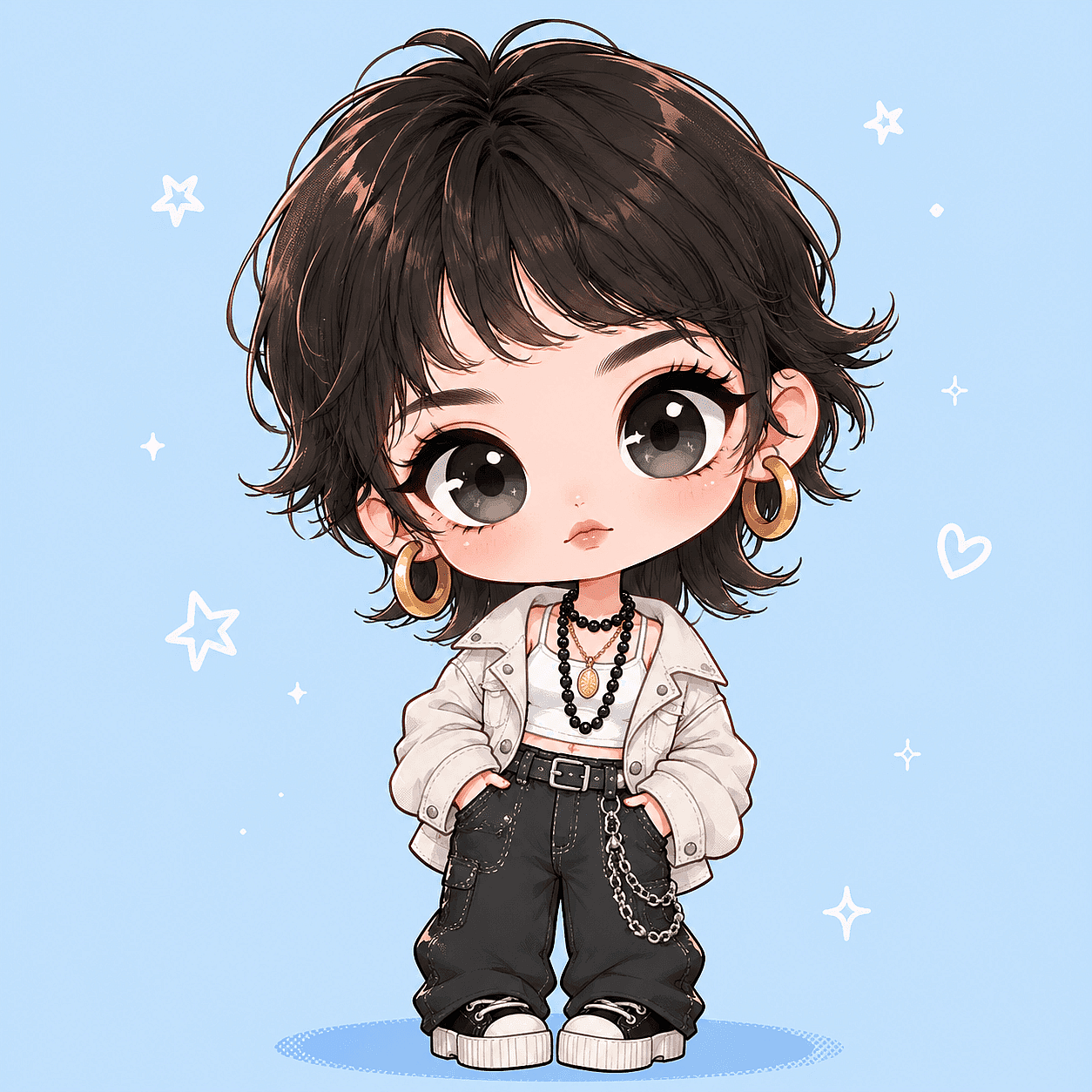
Single portrait, the standard profile picture or avatar conversion
Chibi portrait of a young woman with wavy brown hair and glasses, oversized round head, tiny body, huge sparkling eyes, kawaii anime style, super deformed, plain pastel blue background, soft lighting, high detail
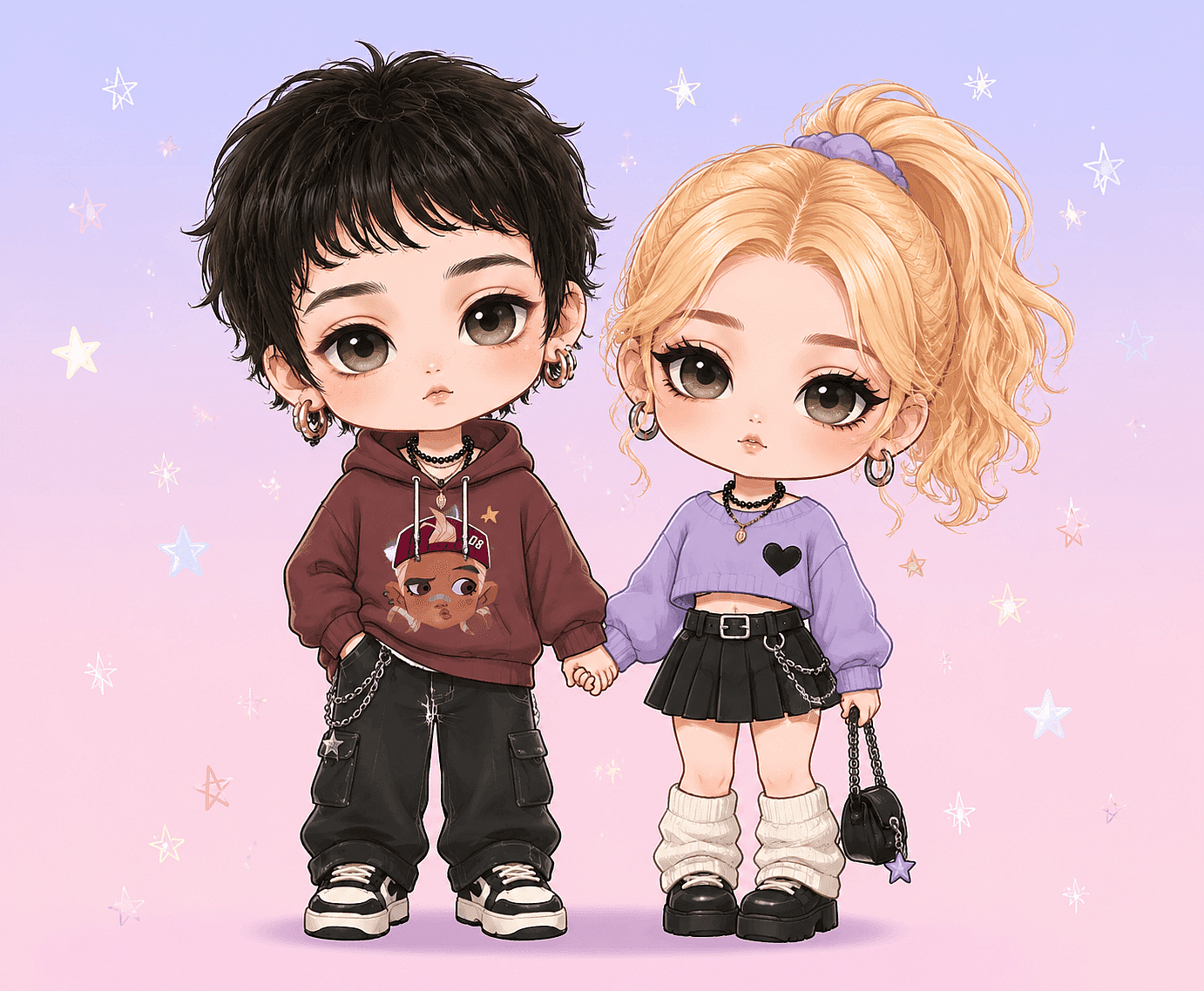
Couple, For Anniversary Gifts And Joint Profile Art
Two chibi characters holding hands, a man with short black hair and a woman with a blonde ponytail, both with oversized heads and tiny bodies, matching huge expressive eyes, kawaii style, super deformed, pastel gradient background, soft lighting, high detail
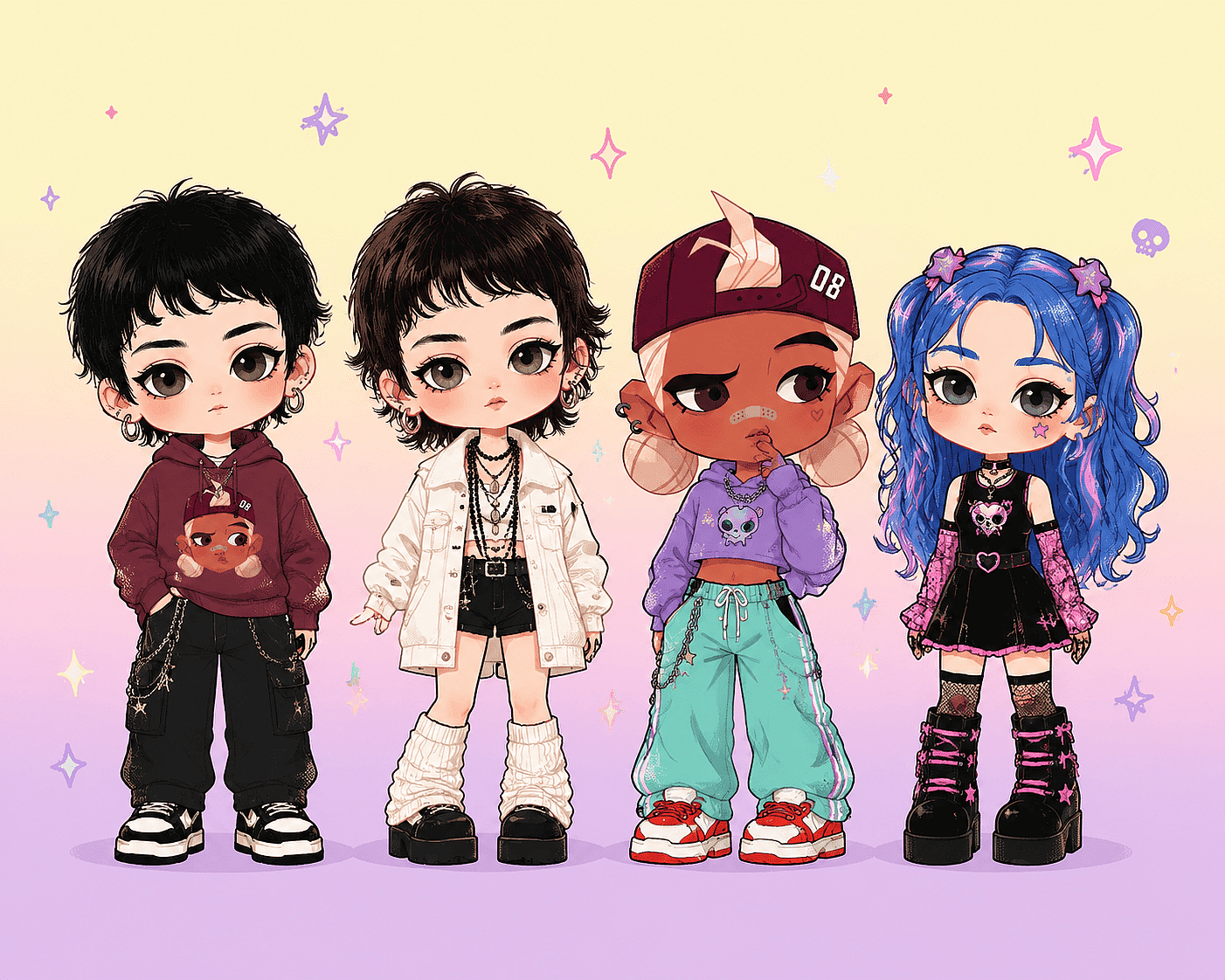
Group, For Team Avatars And Family Portraits
Group of four chibi friends standing in a row, each with an oversized head, tiny body, and distinct hairstyle and outfit, kawaii anime style, super deformed, simple pastel background, soft even lighting, high detail, no overlapping faces
Sticker collage, for messaging packs and printable sheets
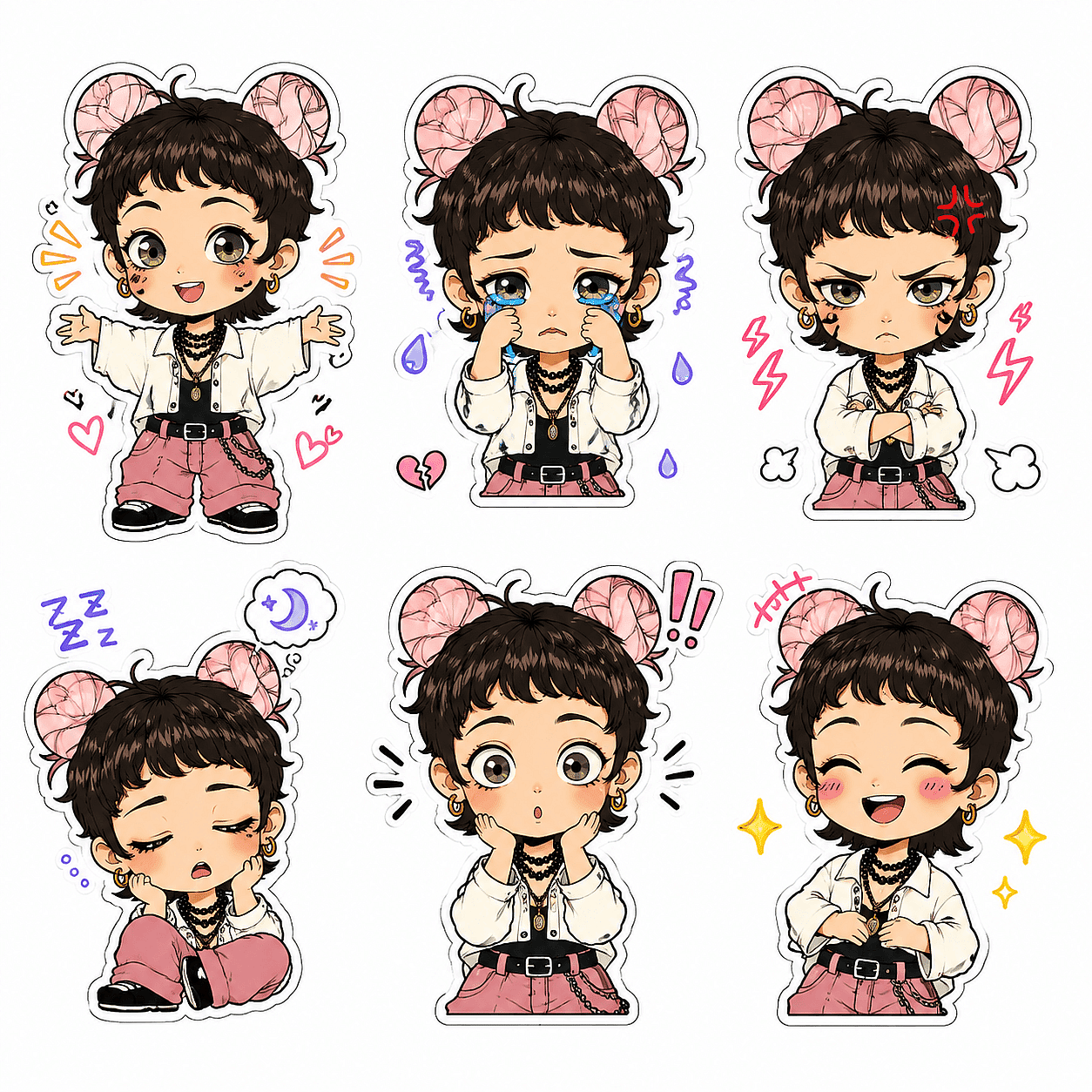
Sticker sheet of six chibi versions of the same girl with pink twin buns showing different emotions: happy, crying, angry, sleepy, surprised, laughing, flat color, cel-shaded, thick white sticker outline around each character, handwritten doodle accents, white background
YouTube Thumbnail Maker
Where a face pays off: a vidIQ study of 500 breakout thumbnails published in 2026 found 69% used a human face, rising to 80% among the biggest overperformers. Faces are not a universal lever though; Hooksnap's 2026 CTR benchmark analysis found expressive faces outperform faceless thumbnails in nearly every niche except music and parts of education, so treat the exact lift as niche-dependent rather than a fixed number:
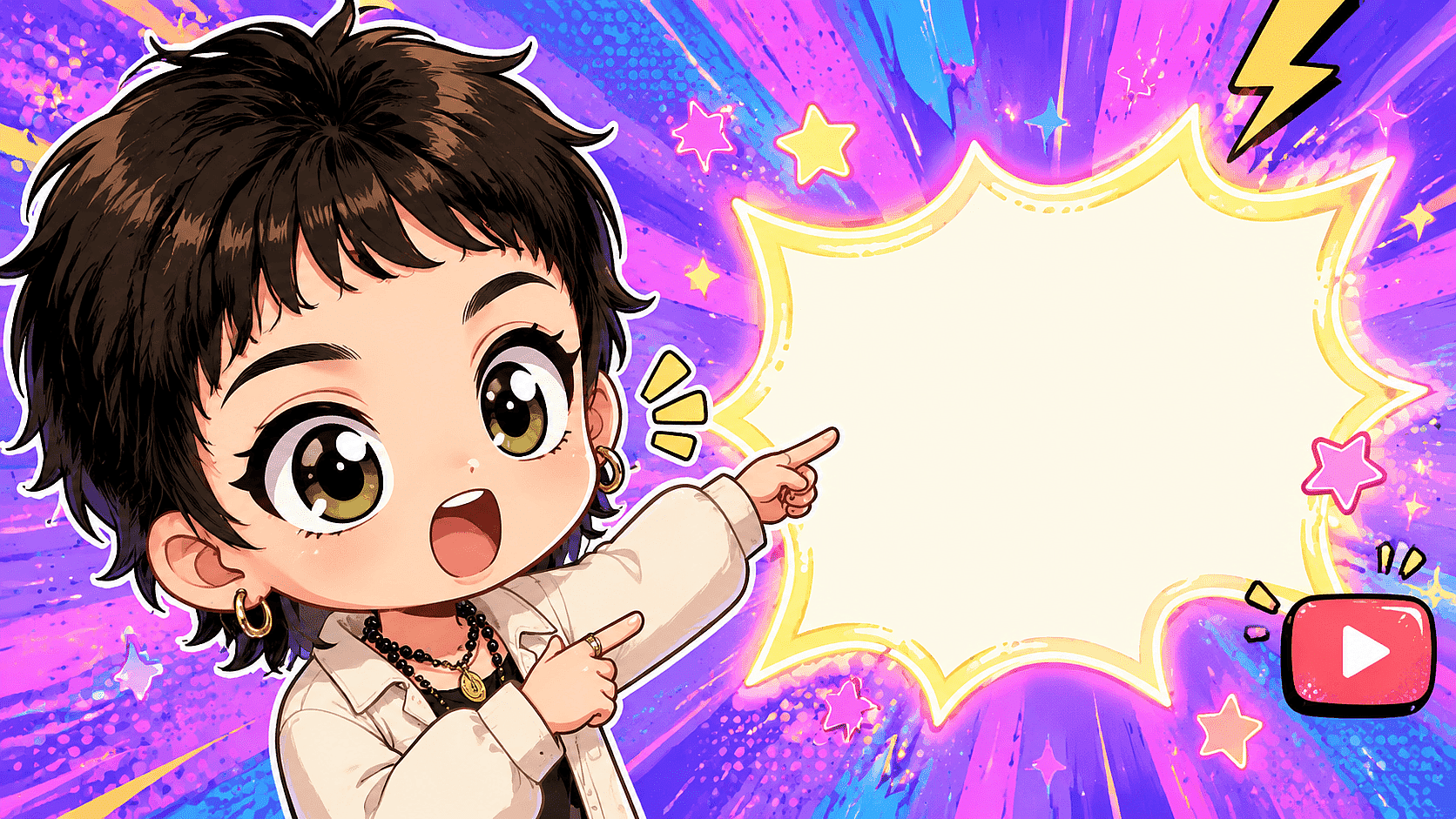
Chibi YouTuber with an excited open-mouth expression pointing at glowing text space, oversized head filling the left third of the frame, huge expressive eyes, bold cel-shaded style, vibrant saturated background with radial speed lines, 16:9 composition, high detail
Keeping Chibi Characters Consistent Across Generations
Use references, saved characters, or LoRA training for consistency. Midjourney's own documentation notes that seeds can behave unpredictably across separate prompting sessions and are not meant to bookmark a style, character, or appearance. A seed replays an identical setup; change the prompt and the character changes with it.
The tools that do work:
- Style and character references: in Midjourney,
--sreflocks the art style and--oref(Omni Reference, V7 and later) anchors the character across new prompts. - Character sheets: generate a multi-pose reference sheet ("chibi character turnaround, front view, side view, back view, expression chart") and feed it back as a reference image for every subsequent generation.
- LoRA training: for a repeatable series or merchandise line, train a custom model. OpenArt's LoRA training takes 4 to 128 reference images, finishes in 5 to 15 minutes, supports Style, Character, Face, and Object types, and saves the model permanently for tag-based reuse.
- Character Builder: the fastest path when you have only one good reference image, as covered in the face preservation section above.
For a client-facing studio producing a chibi mascot across dozens of assets, LoRA plus a saved character is the production-grade combination: the LoRA holds the art style, the character tag holds the identity.
Formatting Chibi Art For Social Media
Generate at the destination ratio instead of cropping after the fact, because chibi compositions center on the head and careless crops decapitate them. Platform specs from official documentation:
- Instagram Stories and Reels: 9:16 aspect ratio, 1080 x 1920 pixels recommended for Stories. Add "9:16 vertical composition, character centered in lower two-thirds" to your prompt so the head clears profile UI overlays.
- Pinterest standard pins: 2:3 ratio at 1000 x 1500 pixels. Vertical chibi portraits with pastel backgrounds fit the format without adaptation.
- YouTube thumbnails: 16:9, with 1280 x 640 the floor for ad thumbnails and 3840 x 2160 now recommended for creator uploads. Generate wide, then upscale.
Sticker sheets deserve their own layout pass: the white sticker outline from the collage template doubles as a cut line for print-on-demand exports.
How To Generate Chibi Art In OpenArt (Step By Step)
The full photo-to-chibi workflow runs through OpenArt's image generator in five steps:
- Upload a reference photo or write a text prompt.
A clear, front-facing photo with even lighting gives the model the most facial information to preserve. - Apply the formula and keywords.
Fill all five slots: subject with proportion cues, style modifier ("kawaii, super deformed"), background, lighting, and finish. Pick your finish keywords from the 2D, 3D toy, or stylized animation sets above. - Switch to image-to-image mode to preserve the face.
Use the reference photo so likeness takes priority over the style transformation. - Add negative prompts, then generate.
Paste the exclusion list from the negative prompt section into the dedicated field and run the generation. - Export or refine.
Use inpainting to fix a hand or eye without regenerating the whole image, then upscale to 4K before exporting for print or thumbnails.
Tips for better results:
- Run the same prompt through two or three different models; chibi generation quality varies more by model than by wording.
- Generate several variations per prompt and select rather than perfecting a single output.
- Keep the reference photo uncluttered; busy backgrounds bleed into the stylized result.
- Save any character you plan to reuse before closing the session, using Character Builder.
The Advanced plan includes commercial use. Everything you generate, including sticker packs and trained models, is yours to sell as merchandise or deliver in client work, with no royalties or attribution required. Check the current pricing page for plan details, since credits and pricing tiers change over time.
FAQ
What are the best chibi style prompt keywords?
"Super deformed," "kawaii," "oversized head," "tiny body," and "huge expressive eyes" are the core proportion triggers, plus a finish term like "cel-shaded" (2D) or "vinyl toy finish" (3D).
How should I structure a chibi prompt?
Five slots: subject, style modifier, background, lighting, finish. Every template in this article follows that order.
Which AI tool is best for chibi art?
Midjourney's Niji 7 is the only anime-tuned model, Stable Diffusion offers the deepest control through LoRAs and weighting, and OpenArt lets you run one prompt across 100+ models instead of committing to a single engine.
How do I turn a photo into chibi without losing the face?
Use image-to-image mode with the photo as a reference, then apply the chibi prompt on top. Plain text prompting cannot reproduce a specific person.
What's the difference between 2D, 3D, and stylized animation chibi?
2D flat uses cel-shading and flat color for stickers; 3D toy uses a glossy vinyl-figure look; stylized animation chibi keeps chibi proportions with soft cinematic 3D lighting, and the storybook variant swaps in watercolor textures.
What negative prompts should I use?
Exclude realistic proportions, distorted faces, extra limbs, extra fingers, photorealistic skin, and text or watermark artifacts.
How do I keep the same chibi character across many images?
Save the character to a persistent library or train a LoRA on 4 to 128 reference images. References and saved characters anchor identity after the prompt changes.
How do I adapt a prompt for couples or groups?
Give each person distinct, named traits (hair, outfit, expression), state that all characters share the oversized-head proportion, and cap groups at four or five to avoid face errors.
Why does my chibi still look like a normal anime character?
The proportion signal is too weak. Add "super deformed, 2 heads tall" and remove any realism cues left in the prompt.
Why am I getting extra limbs or garbled text?
Both are standard generation artifacts, and both belong in your negative prompt: "extra limbs, extra fingers, text, watermark."