

 ChatGPT
 Perplexity
 Claude
 Gemini
Seedance 2.0 is one of the most talked-about AI video generators in 2026. Developed by ByteDance, this advanced AI video model turns text, images, and audio into cinematic 1080p videos — with multi-shot storytelling, character consistency, and native audio sync in a single generation.
Now available on OpenArt, Seedance 2.0 makes it easy to create professional-quality AI videos in minutes. Get 50% OFF for the annually plan and unlock unlimited video creation.
What Is Seedance 2.0?
Seedance 2.0 is a multimodal AI video generation model developed by ByteDance's Seed team. It supports text, image, video, and audio inputs — up to 12 reference assets in a single generation — making it one of the most versatile video AI models available in 2026.
Key capabilities:
- Text-to-Video: Describe a scene in natural language and get a cinematic clip
- Image-to-Video: Animate any still image with realistic motion
- Scene Composition: Combine multiple reference assets (images, videos, audio) to direct complex scenes
- Native Audio Sync: Lip-sync, sound effects, and BGM generated alongside video
- 720p HD Output: High-quality resolution with physics-aware motion
- Character Reference: Use reference images to maintain character appearance across generations
Why Seedance 2.0 Is Trending in 2026
Seedance 2.0 is rapidly gaining popularity among AI creators, and here’s why:
- Backed by ByteDance (TikTok’s parent company)
- Advanced multimodal generation (text, image, audio, video)
- Strong physics realism compared to other AI video models
- Built-in audio generation with lip-sync support
- Multi-reference composition with up to 12 input assets
As AI video tools explode in 2026, Seedance 2.0 stands out as a top-tier cinematic AI video generator.
How to Use Seedance 2.0 on OpenArt
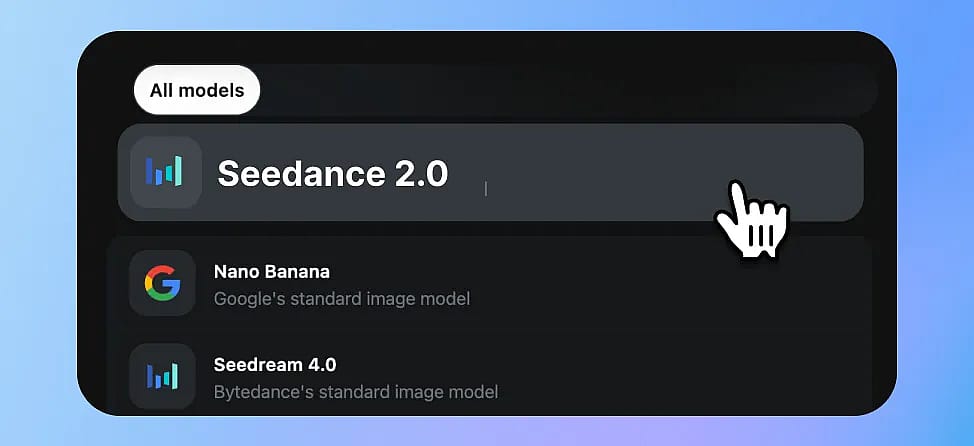
Step 1: Go to the Seedance 2.0 Model Page
Visit Openart and click Create Now. You'll be taken to the generation interface with Seedance 2.0 pre-selected.
Step 2: Choose Your Input Mode
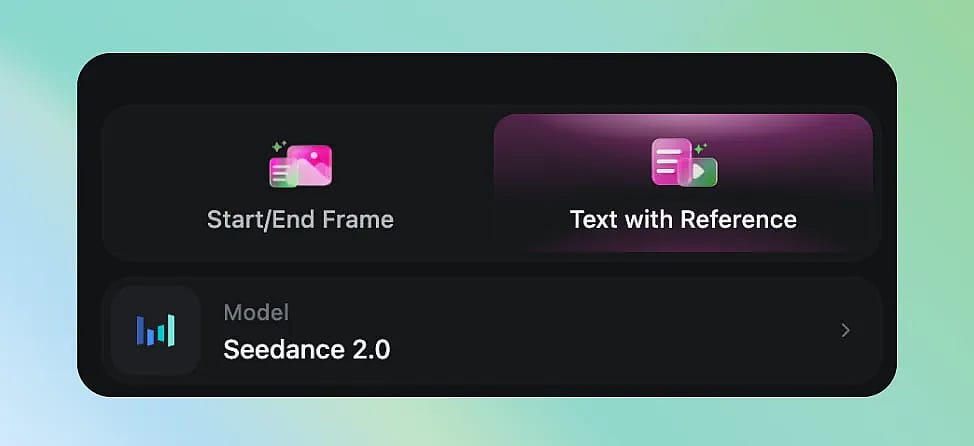
Seedance 2.0 supports multiple creation modes:
- Text-to-Video: Just type your prompt. Best for quick ideas and concept exploration.
- Frame to Video: Upload a reference image and describe the motion you want. Perfect for animating artwork, product shots, or portraits.
- Multi-Modal: Combine text + images + audio references for maximum creative control.
Step 3: Write an Effective Prompt
Seedance 2.0 responds well to structured, descriptive prompts. Here's a formula that works:
[Subject] + [Action] + [Environment] + [Camera Movement] + [Mood/Style]
Example prompts:
A young woman in a red dress walks through a sunlit bamboo forest, wind gently moving her hair. Slow dolly forward, cinematic lighting, golden hour atmosphere.
Close-up of a steaming cup of coffee on a wooden table, rain visible through the window behind it. Shallow depth of field, cozy autumn mood, 4K quality.
A cat jumps from a bookshelf to a couch in a modern apartment. Side tracking shot, natural indoor lighting, realistic physics.
Prompt Formula and tips
- Be specific about camera movement (dolly, pan, tracking, zoom)
- Mention lighting conditions (golden hour, neon, overcast)
- Describe physics interactions (wind, water, gravity) — Seedance 2.0 excels at realistic physics
- For multi-shot: separate scenes with clear transitions ("Cut to..." or "Next scene:")
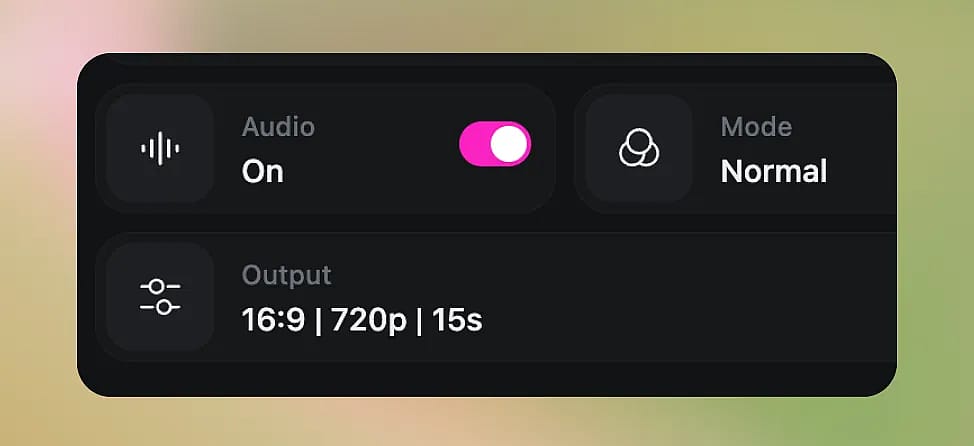
Step 4: Adjust Settings
- Duration: Choose between 5-second and 15-second clips
- Aspect Ratio: 16:9 (landscape), 9:16 (portrait/vertical), or 1:1 (square)
- Quality: Standard or HD — HD takes longer but delivers sharper results
Step 5: Generate and Iterate
Click Generate and wait for your video. Generation typically takes 1-3 minutes depending on duration and quality settings.
Not happy with the result? You can:
- Refine your prompt and regenerate
- Use the video-to-video mode to iterate on a clip you like
- Add audio references for better soundtrack sync
Best Use Cases for Seedance 2.0
| Use Case | Why Seedance 2.0 Excels |
|---|---|
| Social media content | Quick vertical videos with trending aesthetics |
| Product demos | Animate product images with realistic motion |
| Music videos | Native audio sync + multi-shot = complete sequences |
| Storytelling / short films | Multi-shot consistency keeps characters coherent |
| Marketing ads | Cinematic quality without a production budget |
| Concept visualization | Turn mood boards into moving previews |
Seedance 2.0 vs Kling 3.0: Which One Is Better in 2026?
For best results, try the same prompt across 2–3 models and compare the outputs. OpenArt makes it easy to switch models without re-uploading assets — and the comparison table below highlights the key differences between Seedance 2.0 and Kling 3.0.
| Dimension | Seedance 2.0 | Kling 3.0 |
|---|---|---|
| Max Resolution | 1080p | 1080p |
| Video Duration | 5-15s | 5-15s |
| Generation Speed | ~2 min | ~1.5 min |
| Input Types | Text + up to 9 images + 3 videos + 3 audio files | Text + up to 7 images + 1 video + element library |
| Multi-Shot (multi-scene in one go) | Not supported | Supported |
| Character Consistency | Via image reference per generation | Reusable character library |
| Native Audio (BGM + lip sync) | Default on + audio input for beat sync | Optional (sound: on) + separate Lip Sync & TTS APIs |
| Physics Realism (water, fire, gravity) | 🌟🌟🌟🌟🌟Very good | 🌟🌟🌟🌟🌟 Very good |
| Camera Control | Via video reference | Via video reference (feature type) + Motion Brush |
| Facial Close-up Quality | 🌟🌟🌟🌟 Good | 🌟🌟🌟🌟 Good |
| Best For | Short films, music videos, social media, ads | Multi-scene storytelling, talking head / avatar |
| Available on OpenArt | ✅ Yes, and free to try | ✅ Yes, and free to try |
Tips for Getting the Best Results
- Start with image-to-video
if you have a specific visual in mind — it gives Seedance more to work with than text alone - Use reference images for characters
to maintain consistency across generations - Keep prompts under 200 words
Seedance handles concise, structured prompts better than walls of text - Specify what you DON'T want
negative prompts (e.g., "no text overlays, no watermark") can improve output - Iterate fast
generate 3-4 quick drafts before investing in HD quality
Frequently Asked Questions
1. Is Seedance 2.0 free to use on OpenArt?
Seedance 2.0 is available on OpenArt with credits. New users get free credits to try it out, and various subscription plans are available for regular use.
2. What resolution does Seedance 2.0 output?
Up to 1080p HD, depending on your quality settings.
3. Can I use Seedance 2.0 for commercial projects?
Yes, videos generated on OpenArt can be used for commercial purposes under OpenArt's terms of service.
4. How long are the generated videos?
Currently 5 to 10 seconds per generation. For longer content, you can generate multiple clips and edit them together, or use Seedance 2.0's multi-shot feature for coherent sequences.
5. Does Seedance 2.0 support audio?
Yes — it's one of the few models with native audio generation. You can also upload audio references for better sync.