

 ChatGPT
 Perplexity
 Claude
 Gemini
Higgsfield has quickly gained attention among creators who want to generate cinematic AI videos, dynamic camera movements, and social media-ready content. Its visual effects have made it a go-to for short-form video and creative experiments.
But most creative workflows need more than cinematic video. Somewhere between the first idea and the finished post, there's usually an image to generate, a photo to edit, a product shot to clean up, or a set of ad variations to produce, often all in the same afternoon. That's the gap that sends people looking for a Higgsfield alternative: something that covers the rest of the workflow instead of just the video step.
This guide compares the best Higgsfield alternatives for creating AI images, videos, and marketing content.
What Is Higgsfield?
Higgsfield is an AI creative platform built around generating cinematic videos from images and prompts. It's grown fast: the company raised a $130M Series A extension at a $1.3B valuation in January 2026, as Reuters reported at the time, and TechCrunch put its user base at over 15 million in the same coverage. It's known for:
- AI image-to-video generation
- Cinematic camera movements
- Social media video effects
- Creative video templates
- Viral AI video styles
For creators who mainly want to turn a still image into a dynamic video, Higgsfield is an accessible way to get visually impressive results fast. Creators working across more formats, though, often end up needing a broader platform alongside it.
Why Look for a Higgsfield Alternative?
1. Need More Than AI Video Generation
Modern creative work rarely stops at one format. A typical week might involve generating images for inspiration, editing existing photos, building product visuals, designing social assets, and animating a still into a video, sometimes for the same campaign. A platform that covers both image and video generation cuts down on the tool-switching that eats into that workflow.
2. Pricing and Free-Tier Limits
AI creation platforms price things differently, and the details matter more than the headline number. Higgsfield restructured its pricing in late 2025 and dropped its free tier, so getting started now means picking a paid plan from the start, Starter, Plus, Ultra, or a per-seat Business tier, per a 2026 Higgsfield alternatives comparison. Annual billing is also the default at signup, a setup one detailed pricing breakdown flagged as easy to click through without noticing. Credit costs vary a lot by model and resolution too: a clip on a standard model might run a few credits, premium models can burn through dozens per generation, and unused credits expire at renewal instead of rolling over.
None of that makes Higgsfield a bad deal for the right use case. It just means the real cost only becomes clear once you're inside the platform comparing usage against your plan. Before picking a tool, it's worth checking how many generations you actually need, whether you can try it without paying upfront, and whether image and video creation are billed together or separately.
For a closer look at pricing across tools, see our guide: Best AI Generators in 2026: Features, Pricing, and Cost Comparison.
3. A Steep Learning Curve for Newcomers
Higgsfield's own reviews on Trustpilot and G2 are split on this point. Plenty of reviewers describe the interface as clean and quick to pick up. Others, in that same review pool, describe it as confusing when they're new, especially figuring out which mode or camera control fits the shot they're trying to get. If you want a tool you can hand to a new team member without much of a ramp-up period, that mixed track record is worth weighing against your own team's experience before committing.
4. Marketing Teams Need Flexible Creative Tools
AI has become a regular part of commercial content production, from product ads and social campaigns to promotional visuals, brand content, and marketing video. A solid Higgsfield alternative needs to support both the creative exploration phase and the day-to-day production grind that marketing teams actually run on.
Best Higgsfield Alternatives
1. OpenArt: Best All-in-One AI Image, Video and Audio Creation Platform
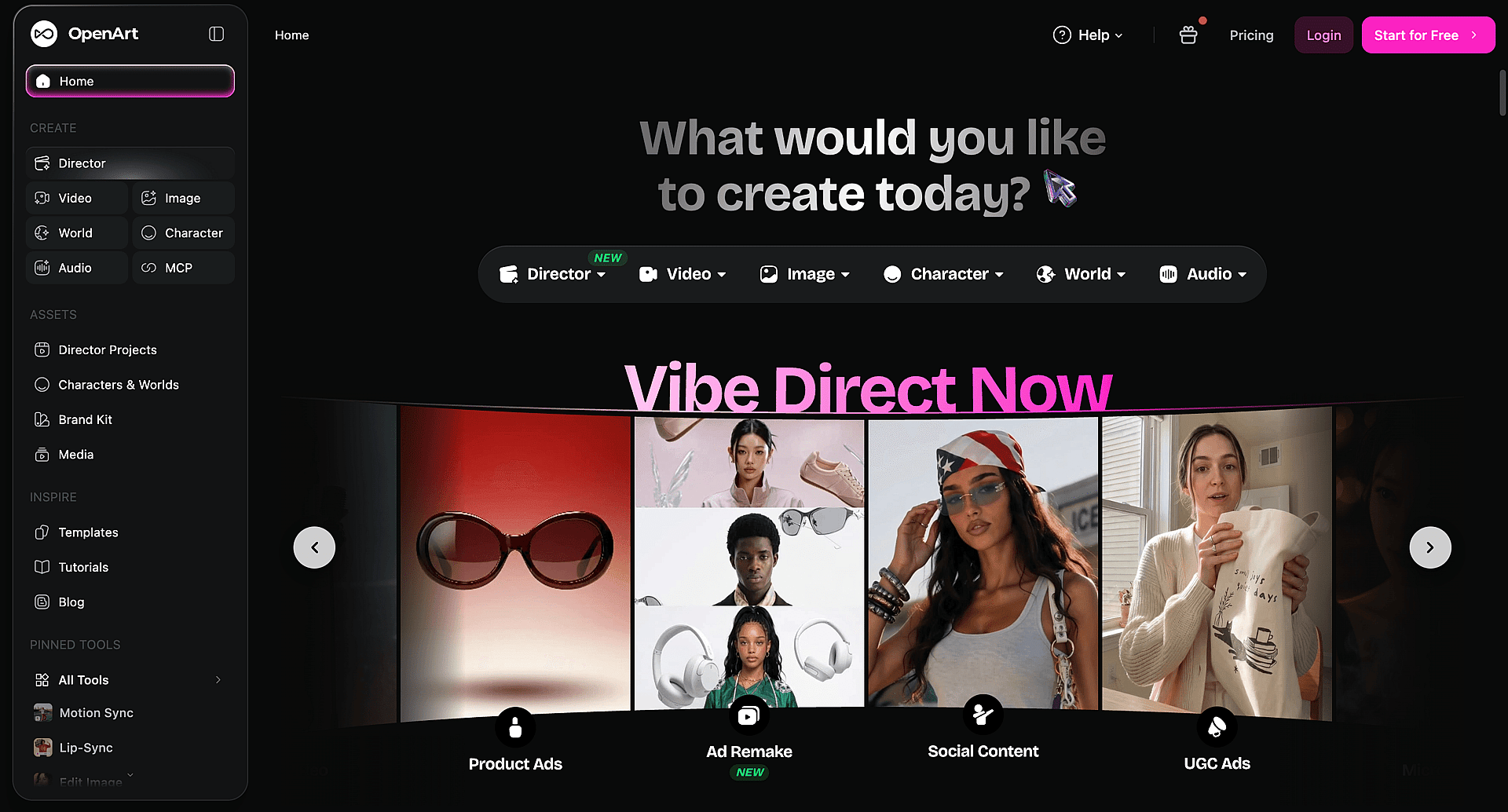
Best for: creators, marketers, and businesses who need a complete AI creative workflow, not just one piece of it.
OpenArt combines AI image generation, image editing, and video creation in one platform. Instead of focusing only on cinematic video effects, it covers the full creative process:
- Create AI images from text or reference images
- Edit and transform photos
- Generate image-to-video content
- Turn any track into a synced AI music video
- Add cinematic AI visual effects
- Build consistent character designs
- Produce marketing visuals
- Work across multiple AI models in one place
Why Choose OpenArt as a Higgsfield Alternative?
1. Create both images and videos
Most creators start with an image before they need a video. OpenArt keeps that in one flow: generate or upload an image, edit and refine it, then turn it into a video without switching tools or re-uploading anything.
2. Start free, no plan required upfront
Unlike Higgsfield's paid-only signup, OpenArt gives you credits to start generating right away. You can test image, video, and editing workflows before deciding which plan fits your volume.
3. Go deeper on image editing than a video-first tool can
Beyond basic touch-ups, OpenArt's editing suite covers inpainting, background and object removal, style transfer, find-and-replace edits, and multi-layer blending, tools built for people who spend real time refining images, not just generating and moving on.
4. Bring OpenArt into the tools you already use
Through OpenArt MCP, you can generate images and video directly inside Claude, ChatGPT, or Cursor, and pull from your existing OpenArt library as a reference without leaving the chat. It's a workflow Higgsfield doesn't currently offer.
5. Keep characters consistent without redrawing them
Character Builder saves a subject once and reuses it across scenes and formats, useful for series content, brand mascots, or any project that needs the same face or character to show up more than once.
6. Create marketing-ready visual content
Beyond social video, OpenArt handles product images, advertising visuals, social graphics, campaign concepts, and other creative assets teams actually need to ship, not just experiment with.
7. Explore multiple creative workflows in one place
Rather than juggling separate tools for image generation, editing, and video, OpenArt keeps all three under one roof. Want to see it for yourself? Try OpenArt free → and start generating images and video from the same dashboard.
2. Runway: Best for Professional AI Video Production
Best for: filmmakers and advanced video creators.
Runway is one of the most established names in AI video, built around text-to-video generation, image-to-video, AI-assisted video editing, and visual effects. If your work centers on professional video production specifically, it's a strong dedicated option. Creators who also need a serious image generation workflow alongside video tend to look at an all-in-one platform instead.
3. Kling AI: Best for Realistic AI Videos
Best for: realistic motion and cinematic scenes.
Kling AI has built its reputation on realistic AI video: natural movement, detailed environments, and cinematic visual quality. It's a solid pick for creators whose priority is realism in storytelling and video generation specifically, rather than a broader image-plus-video toolkit.
4. Pika: Best for Quick AI Video Effects
Best for: social media creators.
Pika is built for speed. Popular uses include image animation, creative effects, short viral videos, and quick social clips. For creators who want fast, accessible AI video effects without a steep learning curve, it's a reasonable fit.
5. Luma AI: Best for Cinematic AI Scenes
Best for: visual storytelling.
Luma AI focuses on generating cinematic scenes: realistic environments, camera movement, and AI-generated video sequences. Creators working on storytelling-driven video tend to reach for it specifically for that cinematic quality.
Higgsfield vs OpenArt: Feature and Parameter Comparison
| Category | Higgsfield | OpenArt |
|---|---|---|
| Primary focus | Cinematic AI video generation and camera control | Combined AI image, video, and audio generation |
| Free tier | None since its late-2025 pricing restructure; paid plans only | Credit-based free tier to start generating |
| Entry-level paid plan | Starter plan, reported at $15/month | Starter plan at $13/month. See current pricing for plan details |
| Billing default at signup | Annual billing selected by default | See pricing page for billing options |
| Model approach | Aggregates multiple third-party models under one subscription | Aggregates multiple third-party and proprietary models under one subscription |
| AI image generation | Available, positioned as a secondary feature to video | Available as a core feature |
| AI image editing | Edit Image (brush-based inpainting), Face Swap, upscaling | Inpainting, background/object removal, style transfer, find-and-replace, multi-layer blending |
| Image-to-video | Available | Available |
| Text-to-video | Available | Available |
| Character consistency | Soul ID | Character Builder |
| Marketing/ad workflow | Marketing Studio, URL-to-video for product ads | Product ad and marketing visual generation |
| Agent/IDE integration | unknow | OpenArt MCP connector for Claude, ChatGPT, and Cursor |
What an Independent Video Comparison Found
Written comparisons only go so far, so it's worth looking at what happens when someone runs the exact same prompt through both platforms and compares the results. In one widely-watched side-by-side video comparison, a creator tested Higgsfield and OpenArt head-to-head on output quality, pricing, interface, and support response times.
A few takeaways are worth calling out directly, including the ones that don't purely favor OpenArt:
- Both platforms are aggregators, not model owners. Neither Higgsfield nor OpenArt trains the underlying video and image models — both route your prompt to outside services like Seedance, Nano Banana, or GPT Image. The reviewer's point: if you only ever use one specific model, going straight to that model's own service can work out cheaper than paying a platform on top of it. The case for using a platform at all shows up when a workflow needs several models in sequence, say, one for the image, another for the video, another for the edit, without juggling separate subscriptions and browser tabs for each.
- The two platforms are close enough that switching rarely pays off. The reviewer's take was that if you're already comfortable in Higgsfield or already comfortable in OpenArt, there's little reason to migrate over small differences alone.
- Pricing favored OpenArt at the time of testing. Running an identical prompt, a 15-second, 4K clip generated through Seedance 2.0, came out noticeably cheaper on OpenArt's plan than on Higgsfield's in the reviewer's cost breakdown. The reviewer also flagged that credit pricing on both platforms shifts over time, so the gap can narrow, or even flip, depending on when you check.
- Interface complexity was the biggest gap. The reviewer described Higgsfield's interface as cluttered and disorienting for a first-time user, with OpenArt's layout easier to get started in, though still not without its own learning curve.
- Feature overlap. The reviewer pointed out that Higgsfield lists a large number of separately named features that often produce very similar results to one another, and said several felt dated compared to what else is currently available.
Worth noting: the reviewer discloses an affiliate relationship with both platforms, meaning they earn a commission regardless of which one a viewer picks. That doesn't erase bias, but it does mean the OpenArt-leaning verdict isn't coming from a financial incentive to favor one over the other.
None of this changes the core recommendation above: once a workflow touches more than one model or format, a platform earns its keep, and on cost and ease of use, OpenArt came out ahead in this test. But it's a fair reminder that the value of any aggregator platform, OpenArt included, comes from convenience and model range, not from owning the underlying technology.
Which Higgsfield Alternative Should You Choose?
Choose OpenArt if you:
- Need both AI images and videos in one workflow
- Want director-level control over multi-scene video instead of single clips
- Need cinematic visual effects without picking up a separate VFX tool
- Create marketing materials regularly, including product ads and social ad creative
- Generate product visuals at scale
- Want a complete creative platform rather than a single-purpose tool
- Prefer one clean workflow over stitching together separate apps for image, video, audio, and effects
Choose Runway if you:
- Need professional video editing tools
- Work on advanced video projects
- Need AI-assisted editing on footage you already shot, not just new generations
Choose Kling AI if you:
- Prioritize realistic AI-generated video above all else
- Need natural motion and detailed environments in longer cinematic scenes
Final Thoughts
Higgsfield has become a popular choice for creators who want cinematic AI video effects and dynamic visual storytelling, and its funding and user numbers back that up. But creative workflows rarely stop at video. Many creators move between generating images, editing visuals, creating marketing assets, and producing videos as part of the same project.
The right Higgsfield alternative depends on how you create. If you need a platform that supports the full journey from idea to finished content, and lets you start without committing to a paid plan first, compare plans and start creating → with a more flexible AI workflow.