
 ChatGPT
 Perplexity
 Claude
 Gemini
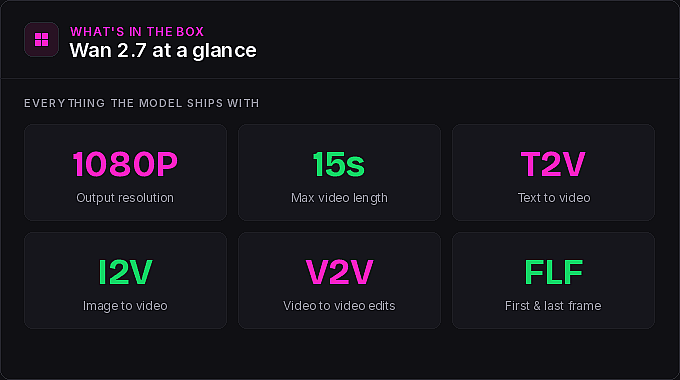
Amidst all the buzz about Kling 3.0, another video model slipped onto OpenArt that deserves a closer look. Wan 2.7 ships 1080p output, video lengths up to 15 seconds, strong first-and-last-frame control, full dialogue support, and a video-to-video edit feature that punches well above its weight. We asked Bob to put it through its paces and document what he found. The result is an 18-minute walkthrough packed with prompts, tips, and the occasional mention of waffles. Here is the full breakdown.
What Wan 2.7 actually ships with → 0:31 in the video
Before the tips, the kit. Wan 2.7 covers everything you expect from a modern video model: text-to-video, image-to-video, and video-to-video editing, first and last frame control, multi-character dialogue support, and reference image inputs that plug directly into OpenArt's consistent character library. The standout is its handling of motion and cinematic control, and Bob flagged this upfront. In his testing, Wan 2.7 pulled off action sequences and transitions that he could not get out of other video models, including Kling 3.0.
Tip 1: Use the six-layer prompt structure → 1:32 in the video
Most modern video models happily accept pure natural language. Wan 2.7 will too, but Bob found mixed results going that route. The model has a structure it prefers, and once you start feeding it prompts in that shape, the outputs get noticeably better. If natural language alone is not getting you where you want to go, this is the first lever to pull.
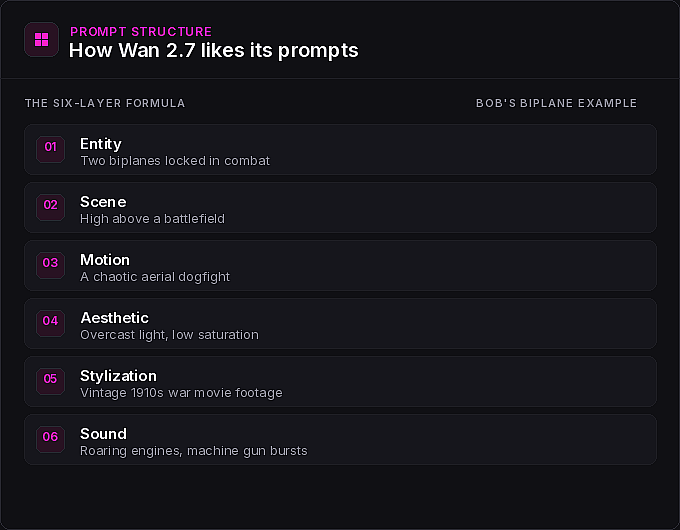
You do not need to write this by hand. Bob recommends pasting the structure into ChatGPT and letting the LLM reformat your idea into the right shape. Less intuitive than just describing what you want, but the prompt adherence pays off.
Bob's first demo of the formula is the biplane dogfight at 2:24. The entity was two biplanes locked in combat. The scene was high above a battlefield. The motion was a chaotic aerial dogfight. The aesthetic called for overcast light and low saturation. The stylization asked for vintage 1910s war movie footage. The sound list included roaring propeller engines, rapid machine gun bursts, and bullets tearing through canvas. Wan 2.7 nailed the prompt adherence, the camera cuts, and the sound design all the way down to the grainy old-film quality. The ink wash swordsman at 3:18 is another clean example: a lone swordsman, a misty mountain river, soft dawn light, low saturation, Asian brush painting aesthetic, soft wooden footsteps on a bridge, and a restrained traditional instrumental score. Every layer showed up in the output.
A useful wrinkle: the formula is a guideline, not a cage. The claymation circus at 3:55 was built from a detailed prompt that did not strictly follow the six-layer structure, and it still landed. The roller coaster derailment that followed used a hybrid approach, a long descriptive paragraph with sound and voice broken out separately. Both work. And for the most complex prompts, like the steampunk catwalk leap at 5:03 where a character has to sprint, jump a gap, grab a chain, and dodge a collapsing gear assembly, expect to run a few generations before you get what you want. Bob's take: it is universally unfair to give a model one shot at a complex scene and call it a failure.
Tip 2: Reference your own characters inside text prompts → 5:45 in the video
This is where Wan 2.7 on OpenArt gets interesting. You can reference any of your existing consistent characters, or any uploaded image, directly inside a text-to-video prompt. With Sora 2 no longer available, Bob makes the case that Wan 2.7 is a strong replacement: you get 15-second videos and the ability to drop your own characters into a scene.
His first demo is ADHD Daryl at 6:08, a character doing a silly dance for a room full of elderly people in a sterile retirement home, trying to get them into the spirit of things. To swap Daryl out for a different character, you remove the reference and pick another from your library, making sure the new character is properly referenced in the prompt. Same scene, different cast member, no rebuild needed.
For more cinematic work, the Bob and Blue dystopian city shot at 9:09 is the one you saw in the video's cold open. Bob used two reference images at once for the Cindy rescue scene at 9:28, an action sequence where Bob and Blue rescues Cindy from the top of a burning building from a helicopter. He used an LLM to draft the long, detailed prompt, then went through and replaced every placeholder name with the proper character references so the model knew exactly who was who.
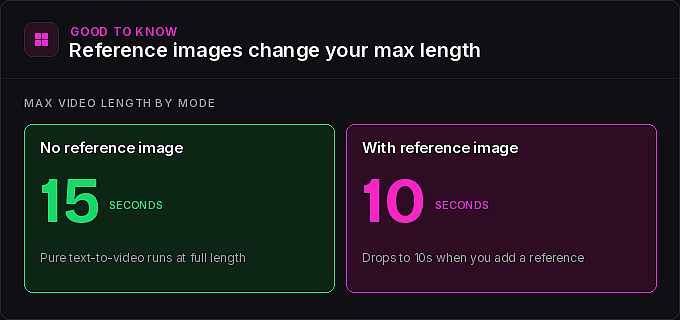
Important catch: when you use a reference image in Wan 2.7, your maximum video length drops from 15 seconds to 10 seconds. Plan accordingly if you are working on a longer scene.
Tip 3: Build characters with the new character creator → 6:46 in the video
If you have not seen the new version of OpenArt's character creator yet, Tip 2 is a good excuse to try it. Navigate to the character icon and click create character. You get three starting points: upload an image to base your character on an existing photo, describe the character with a text prompt, or use the new guided character builder.
The guided builder walks you through it step by step. First you pick a vibe from a list of eras and styles, or skip that step and define your own inner prompt later. Then you pick a gender, an ethnicity, and an age, and add any details you want locked in, like long red hair or a particular outfit. Hit generate and you get four samples to choose from. Every sample is saved to your generation history, so nothing is lost if you do not pick it on the spot. From there, you can set a sample as your character as-is, ask for more like this, or jump into specific edits.
Bob builds a 1920s character he names Belle at 8:00 and drops her straight into a text prompt: leaned up against a piano in a smoky 1920s restaurant, smoke drifting through the air, holding a bottle of wine in one hand and a cigarette in the other, with light piano music in the background, singing a song about waffles. The lyrics were specified in the prompt. The model delivered.
Tip 4: Image-to-video handles full multi-character dialogue → 9:58 in the video
When you start from an image, the prompt structure matters less. So many of the visual details are already locked in by the source frame that you can lean on simpler natural language for camera direction and motion.
Bob's first dialogue test starts from an image of a couple putting together IKEA furniture at 10:04, both wearing exactly the facial expressions you would expect. The dialogue was scripted directly in the prompt, and the model hit every line except the very last one. Action, timing, and emotional tone all came through.
The claymation noir standoff at 10:36 is the more impressive test. Two characters in a tense exchange, with the prompt including a dedicated dialogue section listing every line word for word, plus separate sections for sound effects, ambient sound, and background music. The result held all the way through, and Wan 2.7 even captured the choppy, low-frames-per-second look of real claymation.
For a more emotional scene, Bob used very basic natural language describing a shaky handheld camera and an over-the-shoulder POV shot at 11:12, and let the source image carry the rest. He also tested a car racing down a highway between two enormous waves at 11:49, exactly the kind of dramatic, physically improbable shot image-to-video is great for.
Tip 5: Use high-contrast images for start and end frame transitions → 12:06 in the video
Start and end frame is one of Wan 2.7's most cinematic features, and it works best when you pick two images with stark contrast between them. The model has to invent the entire transformation in the middle, and the bigger the gap, the more interesting the result.
Bob's favorite is a woman on a desert highway becoming the same woman on a snowy mountain ledge at 12:13. Honoring the six-layer structure, the prompt described her walking forward as dust swirled around her boots, then a smooth transformation into the second scene. A useful accident: on his first run he forgot to actually place her in two different locations, but the prompt described both, and the model handled it anyway. Other highlights include a kid lying in bed becoming a kid floating through space at 13:37 and a spinning vinyl record morphing into a planet seen from orbit at 13:59. The vinyl transition gets a little abrupt at the end, but everything leading up to the swap is beautiful.
Tip 6: Edit any video with one prompt → 14:32 in the video
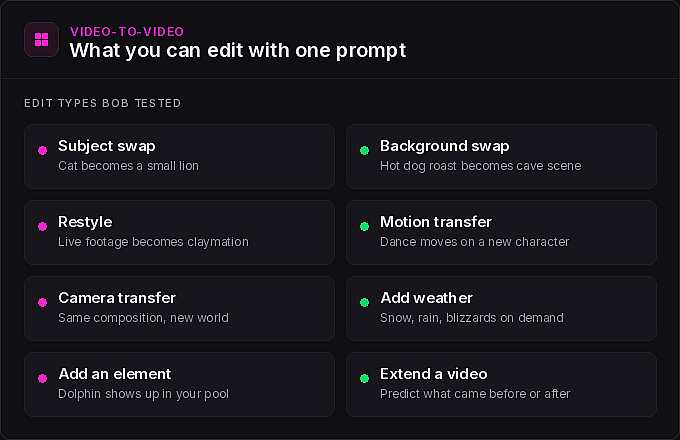
This is the section Bob is most excited about, and it might be the area where Wan 2.7 quietly outperforms expectations. Head to the video section, click edit video, and make sure Wan 2.7 is selected. From there you can take any video up to 10 seconds and give it almost any kind of instruction. Modify backgrounds, swap subjects, restyle a clip, transfer camera motion, transfer subject motion, add weather effects like snow or rain, or extend a video forward or backward in time.
The edits Bob tested are worth watching in sequence:
- Swap subject and background. A hot dog roast becoming a caveman cooking a dinosaur head outside his cave at 15:40, with woolly mammoths walking around in the background. The dialogue got a little weird, but the model held the exact composition, the camera move, and the cuts of the original.
- Motion transfer. A clip of a girl dancing, transferred to one of Bob's characters doing the same dance in a science lab at 16:15. Same choreography, new character, new setting.
- VFX shots. A snap-and-fire effect at 16:34 where a character's hands catch fire on a finger snap, then go out when he blows on them.
- Subject swaps in real footage. From a horse-riding clip: change the horse to an elephant, add a blizzard with the horse covered in snow, or reference one of his characters and have Lita riding the horse instead.
- Scene additions. A cat sleeping on the couch becoming a small lion at 17:26, and a clip of Bob's backyard pool with a dolphin swimming in it at 17:37.
Every one of these landed. If you have been looking for a video editing feature that actually understands what you mean, this is the one to play with first.
The bottom line → 17:46 in the video
Wan 2.7 is not the be-all and end-all of video models, and it is not trying to be. What it is, is a model with a lot of cool tricks up its sleeve, strong action and transition handling, deep reference image support, and a video-to-video edit feature that punches above its weight. Bob got results out of it for action sequences and creative transitions that he could not get out of other models, Kling 3.0 included. The model is also still evolving, with new audio features on the way, so keep an eye on the OpenArt blog and Bob's channel for what ships next.
Bob's tutorial is worth watching in full. And if you are going to try Wan 2.7 yourself, you know what to do.